


Ground News
4.73.25K Reviews
App Specs
- Version
- 4.30.0
- Updated On
- License
- Free
- Downloads
- 1,000,000+
- Developer
- Snapwise Inc.(dba Ground News)
- Categories
- News & Magazines
- Platform
- Android, iOS
Screenshots
 Analysis by AppCompare
During my first week with Ground News, the biggest change was not that I read more headlines; it was that I became more deliberate about what I opened. A story that looked familiar in my usual news routine could lead to a comparison of how different outlets covered it, or reveal that the subject was receiving less attention from one part of the media landscape. That extra context is the app’s strongest early appeal. It makes checking the news feel less like collecting updates and more like asking who is covering a story, and how.
That distinction matters because this is a news app from Snapwise Inc. (dba Ground News), in the News & Magazines category, rather than simply another stream of headlines. It is free to download, though in-app purchases range from $0.99 to $99.99 per item, so I would begin with the free experience and decide whether the additional options suit your habits before spending anything. The app is rated Teen, and its average rating is 4.7 from around 28 thousand ratings, with roughly 3 thousand written reviews. It has over 1 million installs, which suggests it has found an audience among people looking for more context than a conventional headline feed provides.
The first-week appeal: a reason to pause on familiar stories
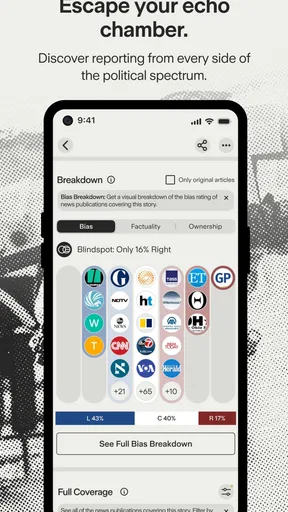
One of the more useful ideas associated with Ground News is its Blindspot Report, which draws attention to stories that are underreported by one side of the political spectrum. I find that most valuable as a prompt, not a verdict. A gap in coverage is a reason to look closer; on its own, it does not prove why an outlet skipped a story or establish which account is correct. Used that way, it nudges me out of a comfortable feed without asking me to accept a label uncritically.
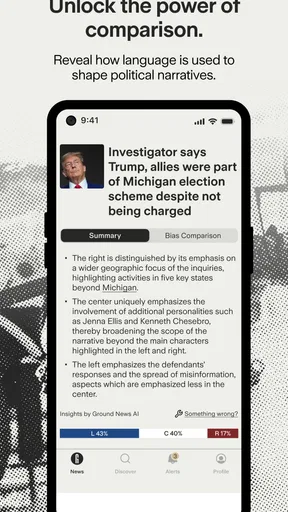
The same habit applies when the app presents coverage of an event from multiple sources. Instead of stopping at the first headline that matches what I already think, I can compare how outlets frame the same subject. That is a practical first-week benefit: it turns a quick news check into a small exercise in noticing emphasis, omissions, and differences in language. I would still open the underlying articles before forming a firm view, but the comparison gives me a better starting point.
What Makes Ground News Stand Out?
So, what makes Ground News different from the gazillion other news apps out there? For starters, it provides a unique feature called the "Blindspot Report." This nifty tool highlights stories that are underreported by either side of the political spectrum. It's like having a built-in radar for bias, helping you see what you might be missing out on.
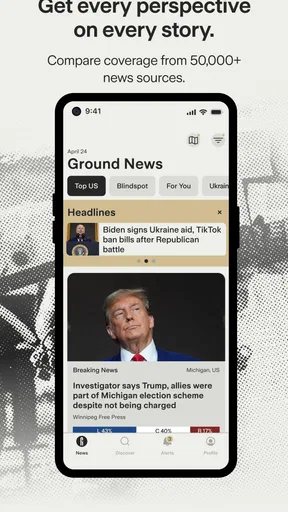
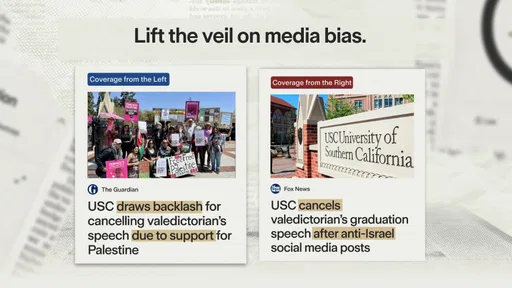
Imagine you're scrolling through your usual news feed, and all you see are stories that align with your beliefs. Ground News comes in, taps you on the shoulder, and says, "Hey, there's more to the story!" It does this by presenting multiple sources side by side, allowing you to compare how different outlets are reporting the same event. Pretty neat, huh?
User Experience and Interface
Now, let's talk about the user interface. Navigating through Ground News is as smooth as butter. The design is clean and minimalist, which I find refreshing. You won't find any unnecessary clutter here. Everything is laid out intuitively, making it easy to dive into the news without any distractions.
Worth Reading Before You Choose

Baby Panda World Brings Quick Play to Modern Phones, but Its Game Library Feels Busy

ESPN’s Live Game View Makes Following Close Games Easier

QuizzLand Review: A Good Fit for Short Trivia Breaks, Not Every Player

Basketball Stars: Multiplayer Is Fast, but Can It Recover When Matches Go Wrong?

WEBTOON Turns Phone Updates Into a Better Reading Routine

Link to Windows Runs on Shared Habits, Not Social Feeds
The app's homepage presents you with trending stories, and you can easily switch between different sections like politics, world news, technology, and more. The categorization is straightforward, so you can quickly find the topics you're interested in. Plus, the app's dark mode feature is a lifesaver for late-night reading sessions.
Features That Pack a Punch
One feature that deserves a shout-out is the "Bias Distribution" chart. It visually represents the political leanings of news sources covering a story. Whether you're leaning left, right, or center, this tool helps you understand how different biases shape the narrative.
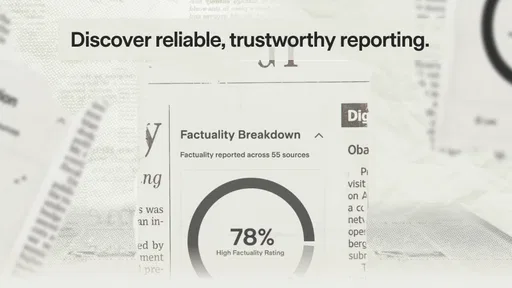
Another cool addition is the "Fact-Checking" feature. Ground News collaborates with trusted fact-checking organizations to help you separate fact from fiction. In a world where misinformation can spread like wildfire, this is a crucial tool to have in your arsenal.
If you're someone who loves to track trends, you'll appreciate the "Timeline" feature. It allows you to see how stories evolve over time, offering a historical perspective on news events. It's like having a time machine for news!
Making it useful beyond the first week
The real test is whether I would keep opening it after the novelty of comparing headlines wears off. I think its recurring value depends on having a few specific questions in mind. When a major public issue is developing, I can use the source comparison to see whether coverage is converging on the same facts or emphasizing different consequences. When I want a broader routine, the topic sections make it easier to check areas I might otherwise neglect. That is more sustainable than trying to read every item the app surfaces.
A realistic daily use is a short check before work: scan the main stories, choose one that could affect a decision or conversation, and compare the coverage before sharing it. If I have only a few minutes, I would not treat every chart or label as something to investigate. I would use them to decide where a second reading is worthwhile, then leave the app. That boundary keeps a tool meant to broaden perspective from turning into another endless feed.
For a student, someone following policy, or a reader who often discusses current events with people who disagree, this workflow can be especially useful. It creates a concrete way to ask, “What does another outlet say?” without assuming that a single publication represents an entire viewpoint. If you mainly want sports scores, local service updates, or a highly personalized feed of familiar topics, a specialist app or your preferred publisher may serve you better.
How it compares with a regular news feed
Compared with a typical publisher app, Ground News is less about following one newsroom’s reporting and more about examining the coverage around a story. A publisher’s app is often the better choice when you already trust its journalists, want its full articles in one place, or need its particular reporting. A general aggregator may be quicker for scanning a broad selection of headlines, but it can leave the reader to work out the differences between sources alone. Ground News makes those differences more visible, which is useful, though it does not replace reading the reporting itself.
The important trade-off is that labels and visual summaries simplify a complicated media landscape. Political leanings are not a complete measure of accuracy, expertise, or reporting quality, and a story’s prominence can shift for reasons other than ideology. I treat the Bias Distribution chart as orientation rather than a scorecard. For a consequential claim, I still compare the articles, check what evidence they cite, and look for primary documents or direct statements where appropriate. The app can guide that work; it cannot do all of it for me.
Small habits that make comparisons more useful
I get more from the app when I compare coverage of the same specific event rather than broad labels about an issue. A headline can sound sharply different while the underlying facts overlap, or two articles can use similar wording while focusing on different consequences. Opening the source articles and checking what each one actually reports helps prevent a chart from becoming a substitute for close reading.
Another useful approach is to use the Blindspot Report as a discovery tool, then ask a separate question: is this story important to me, and what would help me verify it? That keeps the feature from becoming a daily hunt for proof that one side is hiding something. I also find it sensible to revisit a developing story rather than assume the first burst of coverage is the whole picture. The Timeline feature can help with that longer view by showing how coverage changes over time.
These habits do take attention. If I am tired or only want a quick answer, comparing multiple outlets can feel like extra work rather than a benefit. In that moment, I would rather read one clear report from a source I trust and return to a broader comparison when I have time. The app is most rewarding when I choose a story for closer inspection, not when I expect every visit to deliver a complete media-literacy lesson.
Month-to-month value and the maintenance burden
Keeping a news app useful is partly about managing attention. Ground News can broaden what I notice, but no comparison tool can make every story worth following. A simple routine works better for me than checking constantly: use the home screen to catch up, pick one or two subjects to examine more carefully, and stop when I have enough context for the day. This prevents the app from becoming a chore and makes its distinctive features easier to appreciate.
There is also a maintenance burden in the intellectual sense. I have to remember that source groupings and political labels are shortcuts, not final judgments about individual reporting. Outlets can produce strong work on one subject and weaker work on another; a chart cannot capture every difference in expertise, sourcing, or editorial decision. Readers who want a passive feed with no interpretation to do may find this extra evaluation tiring. Readers who enjoy checking how a story is framed are more likely to see that effort as the point.
The app’s current version is 4.25.1 and it runs on Android devices with version 6.0 or later. That makes it accessible to many Android users, while the app is also available on iOS. I would still judge its lasting place by whether I return to it for a real purpose, not by how often I open it. If it helps me catch a significant angle I would have missed, it earns a place in my routine; if I am only scrolling out of habit, a break is probably the better choice.
When the format becomes tiring
There is a limit to how much perspective comparison I want in every news session. Political coverage can be emotionally draining, and seeing competing framings of the same event may make an already stressful subject feel more polarized rather than clearer. The app is not automatically calming just because it shows more than one source. I would avoid using it as a late-night doomscrolling companion, especially when I know I am unlikely to read carefully or distinguish a meaningful disagreement from a difference in tone.
Another possible frustration is that “more sides” can sound like a promise of perfect balance. It is not. Some events have stronger evidence on one point than another, and presenting contrasting coverage does not mean every claim deserves equal weight. For me, the healthiest use is to treat variety as an invitation to investigate, not as proof that truth always sits exactly between two positions.
If you are deciding whether to pay for anything, I would first use the free app long enough to learn which parts genuinely change your reading. The available in-app purchases vary in price, so it is worth checking what an item includes in the app before committing. If all you need is a headline scan, those extras may not improve your routine; if you regularly use its deeper tools, you can judge their value against your own habits rather than buying on impulse.
Is It Worth Your Time?
Alright, let's get down to the nitty-gritty. Is Ground News worth downloading? In my honest opinion, absolutely. Whether you're a news junkie or just someone trying to make sense of the chaos, this app offers valuable insights that you won't find elsewhere.
The app is available for both Android and iOS, and while it's free to download, there's a subscription option for those who want to unlock premium features. But even the free version packs a punch, offering plenty of tools to enhance your news consumption experience.
In conclusion, Ground News is like a breath of fresh air in the crowded world of news apps. It empowers you to make informed decisions by providing multiple perspectives on the same story. So, if you're tired of echo chambers and want to see the bigger picture, give it a shot. Who knows? It might just change the way you look at news forever.
My long-term verdict
I would recommend Ground News to readers who want to challenge the limits of their usual news diet and are willing to read beyond a summary. Its strongest recurring value is not simply showing opposing headlines; it is helping me notice what I might overlook, then giving me a reason to inspect the original reporting. That is a useful role beside a trusted newspaper or broadcaster, rather than necessarily a replacement for one.
I would skip it if I wanted only one publication’s perspective, a narrowly focused news service, or a frictionless stream that asks nothing of me. Its comparisons reward curiosity, but they also ask for judgment and time. For my own routine, I would keep it as a check-in tool for stories that matter, while relying on direct reporting for depth and verification. That balance is what gives it a chance of staying useful after the first-week novelty has faded.
Pros
- Comprehensive news coverage
- Bias-checking feature included
- User-friendly interface
- Customization of news topics
- Frequent updates ensure accuracy
Cons
- Limited free content access
- Ads can be intrusive
- Offline reading not available
- Occasional loading delays
- Lacks in-depth analysis on some stories
FAQs for Ground News
What is Ground News and how does it work?
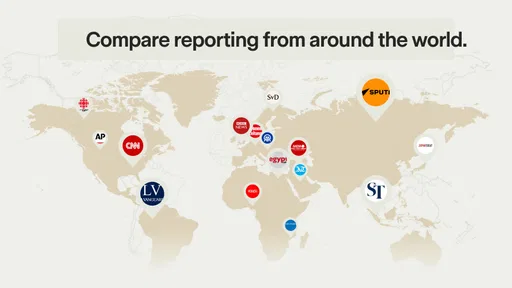
Ground News is a news aggregation app that curates stories from thousands of sources across the globe. It provides a unique feature called 'Bias Checker' which helps users identify the political bias of news sources. The app aims to promote balanced news consumption by allowing users to compare coverage of the same story from multiple perspectives.
Is Ground News free to use, or does it require a subscription?
Ground News offers both free and premium subscription plans. The free version provides access to a wide range of news stories and basic features. However, to unlock advanced features such as unlimited access to the Bias Checker and personalized news feeds, users need to subscribe to their premium plan, which comes with a monthly or yearly fee.
What platforms is Ground News available on?
Ground News is available for download on both Android and iOS platforms. Users can download the app from the Google Play Store for Android devices or the Apple App Store for iOS devices. The app ensures a smooth and intuitive experience across both platforms, catering to a wide range of users.
How does the Bias Checker feature enhance my news consumption?
The Bias Checker feature in Ground News provides a detailed analysis of the political leanings of news sources. This tool helps users understand the bias and perspective of each source, allowing them to consume news more critically and make informed decisions. It encourages balanced news consumption by presenting multiple viewpoints on the same topic.
Does Ground News offer news in multiple languages?
Yes, Ground News supports multiple languages, catering to a diverse global audience. The app includes news stories from various countries, making it accessible for users who prefer consuming news in their native language. This multilingual support enhances the app's usability and broadens its appeal to international users.


